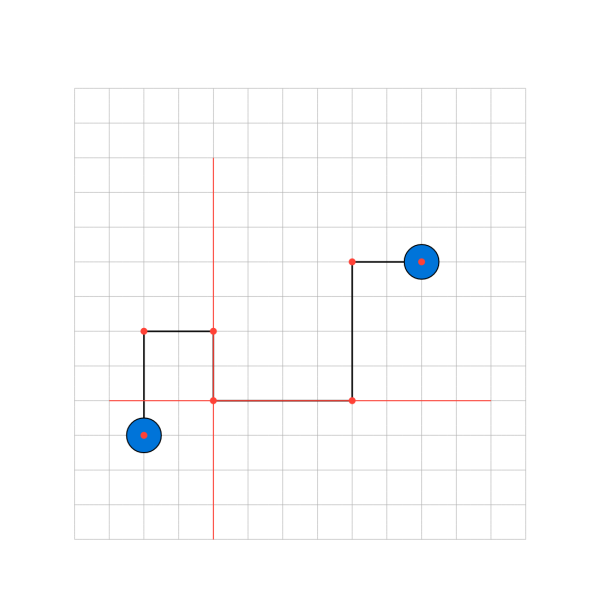
this PR added a guided wire style
the red dots are the points created
the red lines are for the center
basically you can input directions, center, and margin to create a more powerful wire that dodges
its best to just play with it
this PR added a guided wire style
the red dots are the points created
the red lines are for the center
basically you can input directions, center, and margin to create a more powerful wire that dodges
its best to just play with it
<img width="450" alt="guided_wire.png" src="attachments/0d02644a-0df6-4892-89bf-b41cdedb1f9c">
```
#circuiteria.circuit(
length: 3em,
{
import circuiteria: *
import cetz: draw
draw.grid((-2, -2), (11, 11), step: 1, stroke: gray + 0.5pt)
draw.circle((0,1),name:"ci1", fill:blue, radius: 0.5)
draw.circle((8,6),name:"ci2", fill:blue, radius: 0.5)
draw.set-style(stroke: red + 1pt)
wire.wire("w1", ("ci1", "ci2"),
bus: true,
style: "guided",
guided-center: (25%, 20%),
guided-margins: (60%, 25%),
guided-sides: ("north", "west")
)
// draw.line((2,-2),(2,9))
// draw.line((10,2),(-1,2))
draw.set-style(radius: 0.1, fill: red, stroke: none)
draw.circle("w1.start")
draw.circle("w1.start2")
draw.circle("w1.guide-start")
draw.circle("w1.center")
draw.circle("w1.guide-end")
draw.circle("w1.end")
draw.circle("w1.end2")
}
)
```
Blocking a user prevents them from interacting with repositories, such as opening or commenting on pull requests or issues. Learn more about blocking a user.
this PR added a guided wire style

the red dots are the points created
the red lines are for the center
basically you can input directions, center, and margin to create a more powerful wire that dodges
its best to just play with it
added guided wireto feature: added guided wire styleVery nice work, thank you very much 👍